|
Re: LCD screen for your dockstar (cheap! <$5) January 22, 2013 05:57AM |
Registered: 13 years ago Posts: 365 |
Hi joelbi,
first a not-so-serious remark:
I - and I would think most of us here - HATE Windows. And, it seems to me, these "Yada-Yada-Yada" error message you posted just confirm that we are right. :-)
Now to your problem:
You cannot just "stream" an image to the display. Your image must be in the correct RGB565 format and you have to tell the display what you want to do. Have a look at dpfsend 0.2 by MrLinux for an example how to load and convert an image and at dpf-ax/dpflib/scsi.c ("dpf_screen_blit") how to actually send the data to the display.
BTW: did you test that your display is correctly hacked? Does it work under linux (lcd4linux, dpfsend, etc.)?
BTW2: the BSOH (Blue-Screen-Of-Hack) type of hack is rather old - I would recommend to update your dpf to a current firmware.
superelchi
first a not-so-serious remark:
I - and I would think most of us here - HATE Windows. And, it seems to me, these "Yada-Yada-Yada" error message you posted just confirm that we are right. :-)
Now to your problem:
You cannot just "stream" an image to the display. Your image must be in the correct RGB565 format and you have to tell the display what you want to do. Have a look at dpfsend 0.2 by MrLinux for an example how to load and convert an image and at dpf-ax/dpflib/scsi.c ("dpf_screen_blit") how to actually send the data to the display.
BTW: did you test that your display is correctly hacked? Does it work under linux (lcd4linux, dpfsend, etc.)?
BTW2: the BSOH (Blue-Screen-Of-Hack) type of hack is rather old - I would recommend to update your dpf to a current firmware.
superelchi
|
joelbl
Re: LCD screen for your dockstar (cheap! <$5) January 22, 2013 09:04AM |
Thanks for the fast result superlechi!
I don't have a machine I can install linux on (work's machine) and the live ubuntu runs rather slowly on it. so no.
I didn't find any bins of a newer firmware, will be looking through this forum for one shortly...
As i said, I used this code to create an image to the proper format (i understood it is translated from linux code).
The "telling the display what to do" part is where I am right now (I believe, hope), I tried to figure out how to talk with the lcd, was sending bytes of data to it to check what is responds - just have no clue why sending Encoding.Default.GetBytes("CB00000000000000") does not lock the device (every other attept to send will time out untill I reset the device) while sending and image locks it (CB00000000000000 is just some string I remember seeing somewhere)
Am looking for commands list the firmware i have is designed to receive and in which form the data after the command needs to be transfered - I guess looking at the sample you posted might give me a clue.
Thanks again!
Joel.
I don't have a machine I can install linux on (work's machine) and the live ubuntu runs rather slowly on it. so no.
I didn't find any bins of a newer firmware, will be looking through this forum for one shortly...
As i said, I used this code to create an image to the proper format (i understood it is translated from linux code).
The "telling the display what to do" part is where I am right now (I believe, hope), I tried to figure out how to talk with the lcd, was sending bytes of data to it to check what is responds - just have no clue why sending Encoding.Default.GetBytes("CB00000000000000") does not lock the device (every other attept to send will time out untill I reset the device) while sending and image locks it (CB00000000000000 is just some string I remember seeing somewhere)
Am looking for commands list the firmware i have is designed to receive and in which form the data after the command needs to be transfered - I guess looking at the sample you posted might give me a clue.
Thanks again!
Joel.
|
Re: LCD screen for your dockstar (cheap! <$5) January 22, 2013 10:11AM |
Registered: 13 years ago Posts: 365 |
>
> I don't have a machine I can install linux on
> (work's machine) and the live ubuntu runs rather
> slowly on it. so no.
>
No linux? Boo! :-)
> As i said, I used
> [url=http://code.google.com/p/photokeychain/issues
> /attachmentText?id=2&aid=-3826428543647629939&name
> =Program.cs&token=A4PnYkIOdyLNZc363MCLBEXX_2w%3A13
> 57180004416]this[/url] code to create an image to
> the proper format (i understood it is translated
> from linux code).
>
A short look at the source tells me its for a st2205. We are talking about an ax206 - totally different story!
> The "telling the display what to do" part is where
> I am right now (I believe, hope), I tried to
> figure out how to talk with the lcd, was sending
> bytes of data to it to check what is responds -
> just have no clue why sending
> Encoding.Default.GetBytes("CB00000000000000") does
> not lock the device (every other attept to send
> will time out untill I reset the device) while
> sending and image locks it (CB00000000000000 is
> just some string I remember seeing somewhere)
>
Do you mean "CB..." or "CD..."? The 0xcd, ... sequence is the vendor command we use for our hack. For what you have to put where after the 0xcd - have a good look at scsci.c.
Example from scsi.c:
[code]
/** Vendor command for our hacks */
static
unsigned char g_excmd[16] = {
0xcd, 0, 0, 0,
0, 6, 0, 0,
0, 0, 0, 0,
0, 0, 0, 0
};
[/code]
and later on:
[code]
int dpf_screen_blit(DPFContext *h,
const unsigned char *buf, short rect[4])
{
unsigned long len = (rect[2] - rect[0]) * (rect[3] - rect[1]);
len <<= 1;
unsigned char *cmd = g_excmd;
if (h->mode == MODE_USBHID) return DEVERR_UNSUPP;
cmd[6] = USBCMD_BLIT;
cmd[7] = rect[0];
cmd[8] = rect[0] >> 8;
cmd[9] = rect[1];
cmd[10] = rect[1] >> 8;
cmd[11] = rect[2] - 1;
cmd[12] = (rect[2] - 1) >> 8;
cmd[13] = rect[3] - 1;
cmd[14] = (rect[3] - 1) >> 8;
cmd[15] = 0;
return wrap_scsi(h, cmd, sizeof(g_excmd), DIR_OUT,
(unsigned char*) buf, len);
}
[/code]
superelchi
EDIT: sorry about the code sections - the editor didn't translate my [code][/code] ?! Hope you can read it.
Edited 1 time(s). Last edit at 01/22/2013 10:13AM by superelchi.
> I don't have a machine I can install linux on
> (work's machine) and the live ubuntu runs rather
> slowly on it. so no.
>
No linux? Boo! :-)
> As i said, I used
> [url=http://code.google.com/p/photokeychain/issues
> /attachmentText?id=2&aid=-3826428543647629939&name
> =Program.cs&token=A4PnYkIOdyLNZc363MCLBEXX_2w%3A13
> 57180004416]this[/url] code to create an image to
> the proper format (i understood it is translated
> from linux code).
>
A short look at the source tells me its for a st2205. We are talking about an ax206 - totally different story!
> The "telling the display what to do" part is where
> I am right now (I believe, hope), I tried to
> figure out how to talk with the lcd, was sending
> bytes of data to it to check what is responds -
> just have no clue why sending
> Encoding.Default.GetBytes("CB00000000000000") does
> not lock the device (every other attept to send
> will time out untill I reset the device) while
> sending and image locks it (CB00000000000000 is
> just some string I remember seeing somewhere)
>
Do you mean "CB..." or "CD..."? The 0xcd, ... sequence is the vendor command we use for our hack. For what you have to put where after the 0xcd - have a good look at scsci.c.
Example from scsi.c:
[code]
/** Vendor command for our hacks */
static
unsigned char g_excmd[16] = {
0xcd, 0, 0, 0,
0, 6, 0, 0,
0, 0, 0, 0,
0, 0, 0, 0
};
[/code]
and later on:
[code]
int dpf_screen_blit(DPFContext *h,
const unsigned char *buf, short rect[4])
{
unsigned long len = (rect[2] - rect[0]) * (rect[3] - rect[1]);
len <<= 1;
unsigned char *cmd = g_excmd;
if (h->mode == MODE_USBHID) return DEVERR_UNSUPP;
cmd[6] = USBCMD_BLIT;
cmd[7] = rect[0];
cmd[8] = rect[0] >> 8;
cmd[9] = rect[1];
cmd[10] = rect[1] >> 8;
cmd[11] = rect[2] - 1;
cmd[12] = (rect[2] - 1) >> 8;
cmd[13] = rect[3] - 1;
cmd[14] = (rect[3] - 1) >> 8;
cmd[15] = 0;
return wrap_scsi(h, cmd, sizeof(g_excmd), DIR_OUT,
(unsigned char*) buf, len);
}
[/code]
superelchi
EDIT: sorry about the code sections - the editor didn't translate my [code][/code] ?! Hope you can read it.
Edited 1 time(s). Last edit at 01/22/2013 10:13AM by superelchi.
|
joelbl
Re: LCD screen for your dockstar (cheap! <$5) January 22, 2013 10:52AM |
|
joelbl
Re: LCD screen for your dockstar (cheap! <$5) January 22, 2013 04:03PM |
Hey again!
after sending the command line, I get no response and just throwing the image afterwards does not give me the result I expected :)
is there a manner the device (with my old firmware) is expectig to get the bytes of the image? (sending in smaller packets, waiting for response of some sort... protocol... I guess you know better then me.
am looking in http://dpf-ax.svn.sourceforge.net/ > scsi.c right now to understand that,
I did not understand this point from your code quotes (which were very readable, no problem disregarding the "[ code ]" line).
(adding the probe lines right now... will update laters)
the cmd line:
the function I use to send data:
after sending the command line, I get no response and just throwing the image afterwards does not give me the result I expected :)
is there a manner the device (with my old firmware) is expectig to get the bytes of the image? (sending in smaller packets, waiting for response of some sort... protocol... I guess you know better then me.
am looking in http://dpf-ax.svn.sourceforge.net/ > scsi.c right now to understand that,
I did not understand this point from your code quotes (which were very readable, no problem disregarding the "[ code ]" line).
(adding the probe lines right now... will update laters)
the cmd line:
/// <summary>
        /// The command sent in the dpf hack
        /// </summary>
        static byte[] g_excmdBytes = {
            0xcd, 0, 0, 0,
            0, 6, 0, 0,
            0, 0, 0, 0,
            0, 0, 0, 0
        };
the function I use to send data:
private void btnTestDataSend_Click(object sender, EventArgs e)
        {
            ErrorCode ec = ErrorCode.None;

            try
            {
                // Find and open the usb device.
                MyUsbDevice = UsbDevice.OpenUsbDevice(MyUsbFinder);

                // If the device is open and ready
                if (MyUsbDevice == null) throw new Exception("Device Not Found.");

                // If this is a "whole" usb device (libusb-win32, linux libusb)
                // it will have an IUsbDevice interface. If not (WinUSB) the
                // variable will be null indicating this is an interface of a
                // device.
                IUsbDevice wholeUsbDevice = MyUsbDevice as IUsbDevice;
                if (!ReferenceEquals(wholeUsbDevice, null))
                {
                    // This is a "whole" USB device. Before it can be used,
                    // the desired configuration and interface must be selected.

                    // Select config #1
                    wholeUsbDevice.SetConfiguration(1);

                    // Claim interface #0.
                    wholeUsbDevice.ClaimInterface(0);
                }

                // open read endpoint 1.
                UsbEndpointReader reader = MyUsbDevice.OpenEndpointReader(ReadEndpointID.Ep01);

                // open write endpoint 1.
                UsbEndpointWriter writer = MyUsbDevice.OpenEndpointWriter(WriteEndpointID.Ep01);

                //if (!String.IsNullOrEmpty(cmdLine))
                if (File.Exists(Environment.CurrentDirectory + "\\test.bmp"))
                {
                    //Bitmap test = Bitmap.FromFile(Environment.CurrentDirectory + "\\test.bmp");

                    Bitmap source = (Bitmap)Bitmap.FromFile(Environment.CurrentDirectory + "\\test.bmp");

                    //Creat a 16 bit copy of it using the graphics class
                    Bitmap dest = new Bitmap(source.Width, source.Height, System.Drawing.Imaging.PixelFormat.Format16bppRgb565);
                    using (Graphics g = Graphics.FromImage(dest))
                    {
                        g.DrawImageUnscaled(source, 0, 0);
                    }

                    //Get a copy of the byte array you need to send to your tft
                    Rectangle r = new Rectangle(0, 0, dest.Width, dest.Height);
                    BitmapData bd = dest.LockBits(r, System.Drawing.Imaging.ImageLockMode.ReadOnly, System.Drawing.Imaging.PixelFormat.Format16bppRgb565);
                    byte[] TftData = new byte[dest.Width * dest.Height * 2];
                    Marshal.Copy(bd.Scan0, TftData, 0, TftData.Length);
                    dest.UnlockBits(bd);

                    //A 16 bit copy of the data you need to send to your tft is now sitting in the TftData array.


                    //////////////////////////////////////////////////////////////////////////////////////////////////////////////////


                    int bytesWritten;

                    //This writing passes with no errors, but nothing is returned
                    ec = writer.Write(g_excmdBytes, 2000, out bytesWritten);

                    if (ec != ErrorCode.None) throw new Exception(UsbDevice.LastErrorString);

                    Console.WriteLine("Done Command");
                    //this line get written

                    byte[] readBuffer = new byte[1024];
                    while (ec == ErrorCode.None)
                    {
                        int bytesRead;

                        // If the device hasn't sent data in the last 100 milliseconds,
                        // a timeout error (ec = IoTimedOut) will occur.
                        ec = reader.Read(readBuffer, 100, out bytesRead);

                        if (bytesRead == 0) { Console.WriteLine("No more bytes!"); break; }

                        // Write that output to the console.
                        Console.WriteLine(Encoding.Default.GetString(readBuffer, 0, bytesRead));
                    }

                    //no problem untill here:

                    //PASS RGB565 image from earlier encoding
                    ec = writer.Write(TftData, 2000, out bytesWritten);
                    if (ec != ErrorCode.None) throw new Exception(UsbDevice.LastErrorString);

                    //A first chance exception of type 'System.Exception' occurred in USB_LCD.exe
                    //Win32Error:Win32Error:GetOverlappedResult Ep 0x01
                    //31:
                    //The thread '<No Name>' (0x1b28) has exited with code 0 (0x0).

                    //exception was thrown so doesn't get here.....

                    //byte[] readBuffer = new byte[1024];
                    readBuffer = new byte[1024];
                    while (ec == ErrorCode.None)
                    {
                        int bytesRead;

                        // If the device hasn't sent data in the last 100 milliseconds,
                        // a timeout error (ec = IoTimedOut) will occur.
                        ec = reader.Read(readBuffer, 100, out bytesRead);

                        if (bytesRead == 0) { Console.WriteLine("No more bytes!"); break; };

                        // Write that output to the console.
                        Console.WriteLine(Encoding.Default.GetString(readBuffer, 0, bytesRead));
                    }

                    Console.WriteLine("\r\nDone!\r\n");
                }
                else
                    Console.WriteLine("Nothing to do.");
            }
            catch (Exception ex)
            {
                Console.WriteLine();
                Console.WriteLine((ec != ErrorCode.None ? ec + ":" : String.Empty) + ex.Message);
            }
            finally
            {
                if (MyUsbDevice != null)
                {
                    if (MyUsbDevice.IsOpen)
                    {
                        // If this is a "whole" usb device (libusb-win32, linux libusb-1.0)
                        // it exposes an IUsbDevice interface. If not (WinUSB) the
                        // 'wholeUsbDevice' variable will be null indicating this is
                        // an interface of a device; it does not require or support
                        // configuration and interface selection.
                        IUsbDevice wholeUsbDevice = MyUsbDevice as IUsbDevice;
                        if (!ReferenceEquals(wholeUsbDevice, null))
                        {
                            // Release interface #0.
                            wholeUsbDevice.ReleaseInterface(0);
                        }

                        MyUsbDevice.Close();
                    }
                    MyUsbDevice = null;

                    // Free usb resources
                    UsbDevice.Exit();

                }

                // Wait for user input..
                //Console.ReadKey();
            }
        }
|
Re: LCD screen for your dockstar (cheap! <$5) January 23, 2013 03:41AM |
Registered: 13 years ago Posts: 365 |
Some remarks:
You have to fill excmdBytes with the command/parameters you want to execute before sending it. For a blit operation:
There is no need to wait for an answer from the dpf - there will be none for a blit command. :-)
So the two loops
Hope this helps a bit.
superelchi
                    //This writing passes with no errors, but nothing is returned
                    ec = writer.Write(g_excmdBytes, 2000, out bytesWritten);
You have to fill excmdBytes with the command/parameters you want to execute before sending it. For a blit operation:
.
.
.

// ulx - first pixel coordinate on screen, x
// uly - first pixel coordinate on screen, y
// llx - last pixel coordinate on screen, x
// lly - last pixel coordinate on screen, y
g_excmdBytes[6] = 0x12;            // = USBCMD_BLIT --> defined in include/usbuser.h
g_excmdBytes[7] = ulx & 0xFF;
g_excmdBytes[8] = ulx >> 8;
g_excmdBytes[9] = uly & 0xFF;
g_excmdBytes[10] = uly >> 8;
g_excmdBytes[11] = (llx - 1) & 0xFF;
g_excmdBytes[12] = (llx - 1) >> 8;
g_excmdBytes[13] = (lly - 1) & 0xFF;
g_excmdBytes[14] = (lly - 1) >> 8;
g_excmdBytes[15] = 0;

.
.
.

ec = writer.Write(g_excmdBytes, 2000, out bytesWritten);
After this you have to send (llx - urx) * (lly - ury) * 2 bytes of image data.
There is no need to wait for an answer from the dpf - there will be none for a blit command. :-)
So the two loops
                    byte[] readBuffer = new byte[1024];
                    while (ec == ErrorCode.None)
                    {
                    .
                    .
                    .
                    }
can be removed.
Hope this helps a bit.
superelchi
|
joelbl
Re: LCD screen for your dockstar (cheap! <$5) January 23, 2013 07:25AM |
|
joelbl
Re: LCD screen for your dockstar (cheap! <$5) January 23, 2013 07:34AM |
A few questions:
// ulx - first pixel coordinate on screen, x
// uly - first pixel coordinate on screen, y
// llx - last pixel coordinate on screen, x
// lly - last pixel coordinate on screen, y
wont these values be always set to 0 or 128?
or are they rect or point type? which means they hold {0,0} , {0,128}, {128,0} and {128,128} ?
and if so! :) how do I represent 0,128 in a byte? or is it the location in a 2d array representing the whole photo rectangle?
this part confuses me...
// ulx - first pixel coordinate on screen, x
// uly - first pixel coordinate on screen, y
// llx - last pixel coordinate on screen, x
// lly - last pixel coordinate on screen, y
wont these values be always set to 0 or 128?
or are they rect or point type? which means they hold {0,0} , {0,128}, {128,0} and {128,128} ?
and if so! :) how do I represent 0,128 in a byte? or is it the location in a 2d array representing the whole photo rectangle?
this part confuses me...
|
Re: LCD screen for your dockstar (cheap! <$5) January 23, 2013 09:13AM |
Registered: 13 years ago Posts: 365 |
|
joelbl
Re: LCD screen for your dockstar (cheap! <$5) January 24, 2013 03:47PM |
Hey Superelchi
Have been trying many methods to write / transfer bytes (16 - just probing) to the ax 206 for the last couple of days... with no luck of getting anything back.
I wondered if I have a correct firmware at all, so I started downloading those who seem like they would fit my dpf's description but:
1 - you said the BSOH is an old firmware - and they all show it. meaning none is new.
2 - I tried these:
dpf_dump.bin : "original", not really - it's a french version that worked, the original I am afraid.. is long gone :))
dpf_ebay_abeyerr_fulldump.bin
fw_disp_avlabs_avl969s
fw_disp_tavoc.bin
my dpf is ax206 for sure (the firmware uploads through the utility and is confirmed to work as a rom burner)
it had a 2 MB bin
it had space for 107 pics I think.
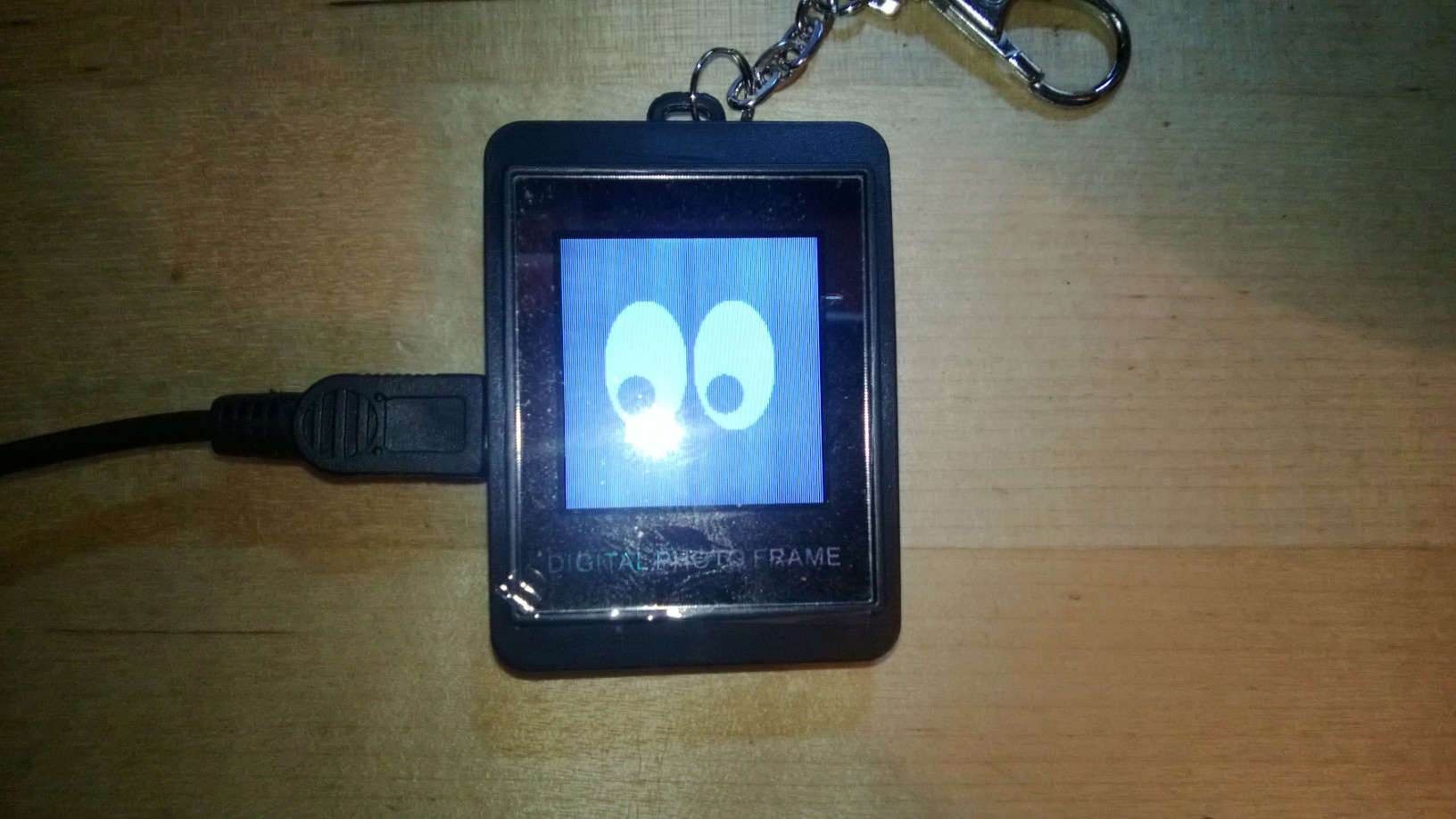
it looks like This.. only black.
no button ever worked after uploading a hacked fw.. which is rather frustrating to see the blue screen untill the battery dies.. no images.. no good use of energy... very sad.
hope you can help me in finding the right bin to install. maybe then I'll get results from my code. :\
And I am very thankfull for your help on my new hobby! :)
Joel
Have been trying many methods to write / transfer bytes (16 - just probing) to the ax 206 for the last couple of days... with no luck of getting anything back.
I wondered if I have a correct firmware at all, so I started downloading those who seem like they would fit my dpf's description but:
1 - you said the BSOH is an old firmware - and they all show it. meaning none is new.
2 - I tried these:
dpf_dump.bin : "original", not really - it's a french version that worked, the original I am afraid.. is long gone :))
dpf_ebay_abeyerr_fulldump.bin
fw_disp_avlabs_avl969s
fw_disp_tavoc.bin
my dpf is ax206 for sure (the firmware uploads through the utility and is confirmed to work as a rom burner)
it had a 2 MB bin
it had space for 107 pics I think.
it looks like This.. only black.
no button ever worked after uploading a hacked fw.. which is rather frustrating to see the blue screen untill the battery dies.. no images.. no good use of energy... very sad.
hope you can help me in finding the right bin to install. maybe then I'll get results from my code. :\
And I am very thankfull for your help on my new hobby! :)
Joel
|
joelbl
Re: LCD screen for your dockstar (cheap! <$5) January 24, 2013 03:50PM |
|
joelbl
Re: LCD screen for your dockstar (cheap! <$5) January 24, 2013 05:06PM |
|
Re: LCD screen for your dockstar (cheap! <$5) January 25, 2013 02:47AM |
Registered: 13 years ago Posts: 365 |
No key working? Looks like the display is not hacked correctly.
There is nothing I can do without a dump of the original fw.
You can try if any fw of the known dps works. A list is here, and compiled fw here. Try any of the 128x128 types and see if you get the eyes. If not - brick.
I would strongly recommend to get yourself a linux machine and try if your display works there!
It's no use to try to implement a driver for a new os if you do not know if the device you are trying to connect is working correctly.
superelchi
There is nothing I can do without a dump of the original fw.
You can try if any fw of the known dps works. A list is here, and compiled fw here. Try any of the 128x128 types and see if you get the eyes. If not - brick.
I would strongly recommend to get yourself a linux machine and try if your display works there!
It's no use to try to implement a driver for a new os if you do not know if the device you are trying to connect is working correctly.
superelchi
|
joelbl
Re: LCD screen for your dockstar (cheap! <$5) January 25, 2013 05:31AM |
Hey, you are absolutely right on the linux machine... just got an old laptop to put something on.. it's an atom with 256 (!) MB ram so no new distributions would work on it. if any. or I'll go search for missing parts to assemble a desktop for it.. (which will be a whole new project for me until I get back to the dpf)
Did try almost all 128X128, no eyes... :(
Wondering why the fw_disp_abeyerr_black_2 bin is missing - it is the one that looks exactly like my key-chain dpf :)
Thank you so much for the help so far!
will understand if you should retire from supporting me..
Have an excellent weekend!
Joel.
Did try almost all 128X128, no eyes... :(
Wondering why the fw_disp_abeyerr_black_2 bin is missing - it is the one that looks exactly like my key-chain dpf :)
Thank you so much for the help so far!
will understand if you should retire from supporting me..
Have an excellent weekend!
Joel.
|
joelbl
Re: LCD screen for your dockstar (cheap! <$5) January 25, 2013 06:56AM |
Tried
fw_disp_linkdelight_black_portrait
fw_disp_abeyerr_black_2 and 1
acme...
I guess some factories decided to take the chip and casing and play memory games with me... I'll find it.. I hope - or go get another one from the same place and get the fw out of it to take a look (don't think they still have any - it's rather old).
Thanks for effort!
fw_disp_linkdelight_black_portrait
fw_disp_abeyerr_black_2 and 1
acme...
I guess some factories decided to take the chip and casing and play memory games with me... I'll find it.. I hope - or go get another one from the same place and get the fw out of it to take a look (don't think they still have any - it's rather old).
Thanks for effort!
|
Re: LCD screen for your dockstar (cheap! <$5) January 25, 2013 07:08AM |
Registered: 13 years ago Posts: 365 |
|
joelbl
Re: LCD screen for your dockstar (cheap! <$5) January 25, 2013 09:29AM |
|
Re: LCD screen for your dockstar (cheap! <$5) January 26, 2013 04:26AM |
Registered: 13 years ago Posts: 365 |
|
joelbl
Re: LCD screen for your dockstar (cheap! <$5) January 26, 2013 08:00AM |
Woah, and it was you who wrote it! :))
(big surprise! fake windows hater you are)
If i get another frame it should be the same since it was given as a gift at the car depot (- that is one big eason why I don't feel bad about bricking the first one), they had a custom rom with the garage's logo (splash screen) and it is cheap :)
probably, if they have more - they are from the same kind.
if no - than I might just get another one and this time save the rom first! :))
hopefully dissasemble it, learn 8051 and c (much more usefull than c# in this area..).. hack it, and upload it myeslf (using your tools of course)...
What is the main difference between all these firmwares you upload here? the lcd's address? the memory can't be the deal since you don't use more than 512kb for any of them...
Where would you suggest a newbe like me to start looking?
Wish you'd need my help on IT stuff to help back :) but I doubt you need any help in anything computer related..
joel
(big surprise! fake windows hater you are)
If i get another frame it should be the same since it was given as a gift at the car depot (- that is one big eason why I don't feel bad about bricking the first one), they had a custom rom with the garage's logo (splash screen) and it is cheap :)
probably, if they have more - they are from the same kind.
if no - than I might just get another one and this time save the rom first! :))
hopefully dissasemble it, learn 8051 and c (much more usefull than c# in this area..).. hack it, and upload it myeslf (using your tools of course)...
What is the main difference between all these firmwares you upload here? the lcd's address? the memory can't be the deal since you don't use more than 512kb for any of them...
Where would you suggest a newbe like me to start looking?
Wish you'd need my help on IT stuff to help back :) but I doubt you need any help in anything computer related..
joel
|
Re: LCD screen for your dockstar (cheap! <$5) January 26, 2013 10:15AM |
Registered: 13 years ago Posts: 365 |
joelbl Wrote:
-------------------------------------------------------
> Woah, and it was you who wrote it! :))
> (big surprise! fake windows hater you are)
>
No. I didn't write it. It's from here. Just made it available for those poor windows users. ;-)
>
> What is the main difference between all these
> firmwares you upload here? the lcd's address? the
> memory can't be the deal since you don't use more
> than 512kb for any of them...
>
Difference is the communication with the lcd. Every lcd needs a different blit & init routine. See all those lcdblit.s / lcdinit.s files in the src/lcd subdirectories.
> Where would you suggest a newbe like me to start
> looking?
>
Read the wiki, get the hardware manuals, read the source.
As I said some pages before:
superelchi
-------------------------------------------------------
> Woah, and it was you who wrote it! :))
> (big surprise! fake windows hater you are)
>
No. I didn't write it. It's from here. Just made it available for those poor windows users. ;-)
>
> What is the main difference between all these
> firmwares you upload here? the lcd's address? the
> memory can't be the deal since you don't use more
> than 512kb for any of them...
>
Difference is the communication with the lcd. Every lcd needs a different blit & init routine. See all those lcdblit.s / lcdinit.s files in the src/lcd subdirectories.
> Where would you suggest a newbe like me to start
> looking?
>
Read the wiki, get the hardware manuals, read the source.
As I said some pages before:
Quote
... if you like to learn ax206 programmming / 8052 assembler / sdcc / etc. - your welcome! Just be prepared for some hard weeks of studying hardware manuals and source code, frustration, head scratching and bricked dpfs. At least that the way I learned it. :-)
superelchi
|
joelbl
Re: LCD screen for your dockstar (cheap! <$5) January 26, 2013 10:25AM |
|
joelbl
Re: LCD screen for your dockstar (cheap! <$5) February 10, 2013 09:57AM |
hey superelchi or anyone else that could help around here :)
finally got my dpf from:
http://www.ebay.com/itm/280828187564
I guess it is the abeyerr black 2 by the list
dpf_dump I d/l to the computer can be found here
1- can anyone please tell me if it is a valid dump (meaning I have a copy that I made right and can start messing up the device)?
2 - is it really the abeyerr black 2 fw that I need to use ?
Thanks a lot!
Joel.
finally got my dpf from:
http://www.ebay.com/itm/280828187564
I guess it is the abeyerr black 2 by the list
dpf_dump I d/l to the computer can be found here
1- can anyone please tell me if it is a valid dump (meaning I have a copy that I made right and can start messing up the device)?
2 - is it really the abeyerr black 2 fw that I need to use ?
Thanks a lot!
Joel.
|
Re: LCD screen for your dockstar (cheap! <$5) February 10, 2013 11:20AM |
Registered: 13 years ago Posts: 365 |
You dump is valid. :-)
But it's not abeyerr_black_2. :-(
Please try attached fw.
superelchi
But it's not abeyerr_black_2. :-(
./identify.py dpf_dump.bin
Looking for firmware.............: Found (coby, 128x128 px).
Looking for Openwin..............: Found.
Looking for LcdIniTbl............: None.
Looking for known signatures.....: None.
Looking for known version info...: None.

Sorry, no matching dpf found.
But following models have a partial signature match: [['abeyerr_black_2'], ['acme_1'], ['jovisa'], ['sunluxy']]
Any of these may work. But to be sure I added a new one (abeyerr_black_3).
Please try attached fw.
superelchi
|
joelbl
Re: LCD screen for your dockstar (cheap! <$5) February 10, 2013 11:39AM |
Hey wow!
Thanks for the effort! :))
Your support is rare - and this is your hobby! lol..
apparently, the memory is a new chip for the flash tool
:\
tried an ini file I saw around here but no luck... will look for information on the net maybe there's a newer version of the ini file somewhere... or specs to explain which values I should (if I can) put there.
Thanks again!
Joel.
Thanks for the effort! :))
Your support is rare - and this is your hobby! lol..
apparently, the memory is a new chip for the flash tool
:\
tried an ini file I saw around here but no luck... will look for information on the net maybe there's a newer version of the ini file somewhere... or specs to explain which values I should (if I can) put there.
Thanks again!
Joel.
|
Re: LCD screen for your dockstar (cheap! <$5) February 10, 2013 12:00PM |
Registered: 13 years ago Posts: 365 |
|
joelbl
Re: LCD screen for your dockstar (cheap! <$5) February 10, 2013 12:08PM |
This forum has good people all over!
found the ini I was needed through google, in another thread on this site :)
so.. WOOOHOOO! on the first shot you nailed it superelchi, the fw works as far as I can see...
I'll try that lcd4linux and then see if my driver was written in the right direction as well :)
Have an excellent week!!
Cheers!
Joel.
found the ini I was needed through google, in another thread on this site :)
so.. WOOOHOOO! on the first shot you nailed it superelchi, the fw works as far as I can see...
I'll try that lcd4linux and then see if my driver was written in the right direction as well :)
Have an excellent week!!
Cheers!
Joel.
|
joelbl
Re: LCD screen for your dockstar (cheap! <$5) February 10, 2013 03:39PM |
Hey superelchi
I have installed ubuntu 8.01 on a P4 machine with 2 gb ram, all is running except I had to get the st2205tool from the wiki's link, the link in the first page of this thread is broken.
the cmd apt-get install libgd2-xpm-dev
results in an error saying "Couldn't find package"
and the make && make install without getting that c compiler (I'm guessing that's what it is) results in 2 compile errors...
gh.h - no such file
and "expected ';' before 'im' in main.c:38...
is there a specific distribution you recommend?
Thanks!
Joel.
I have installed ubuntu 8.01 on a P4 machine with 2 gb ram, all is running except I had to get the st2205tool from the wiki's link, the link in the first page of this thread is broken.
the cmd apt-get install libgd2-xpm-dev
results in an error saying "Couldn't find package"
and the make && make install without getting that c compiler (I'm guessing that's what it is) results in 2 compile errors...
gh.h - no such file
and "expected ';' before 'im' in main.c:38...
is there a specific distribution you recommend?
Thanks!
Joel.
|
Re: LCD screen for your dockstar (cheap! <$5) February 12, 2013 03:21PM |
Registered: 12 years ago Posts: 4 |
Hello,
I would be grateful if somebody hack the firmware on my dpf, which currently is not supported. I tried identify.py but got:
I didn't try suggested three models because don't want to brick the dpf.
lsusb info:
I attached dumped firmware.
I would be grateful if somebody hack the firmware on my dpf, which currently is not supported. I tried identify.py but got:
sudo python ../fw/identify.py full.bin
Looking for firmware.............: Found (buildwin, 128x128 px).
Looking for Openwin..............: Found.
Looking for LcdIniTbl............: Found.
Looking for known signatures.....: None.
Looking for known version info...: None.

Sorry, no matching dpf found.
But following models have a partial signature match: [['agk_violet'], ['dx27893'], ['eachdesk_tumbler']]
I didn't try suggested three models because don't want to brick the dpf.
lsusb info:
Bus 001 Device 007: ID 1908:0102 GEMBIRD
I attached dumped firmware.
|
Re: LCD screen for your dockstar (cheap! <$5) February 13, 2013 08:26AM |
Registered: 13 years ago Posts: 365 |
|
Re: LCD screen for your dockstar (cheap! <$5) February 13, 2013 03:03PM |
Registered: 12 years ago Posts: 4 |
Thanks for the quick response! I tried to flash with your firmware but but without a success:
There is only the "Eovision" logo/name on the dpf. No manfacuter/company on the box just "Digtal Photo Frame" Made in China :).
$ sudo ../fw/hiddetach
Detaching dpf at 2-1.2:1.0... done.
$ sudo python ../fw/restore.py fw_acme_3.bin -f
Found AX206 DPF (bootloader)
failed to open flash driver
Traceback (most recent call last):
  File "../fw/restore.py", line 35, in <module>
    size = detect.detect_flash(d)
  File "[...]/dpf-ax/trunk/fw/detect.py", line 79, in detect_flash
    manu, dev0, dev1 = d.probeFlash()
SystemError: 94:(ffffffff): Unknown error
There is only the "Eovision" logo/name on the dpf. No manfacuter/company on the box just "Digtal Photo Frame" Made in China :).